External Display BrowserModo escritorio5 min de lectura
¿Añadió iOS 26 un modo escritorio al iPhone? La respuesta real, y qué usar en su lugar
Versión corta: no. En 2026 sigue sin haber un modo escritorio en el iPhone. Conecta tu teléfono a un monitor con el iOS de serie y obtienes un duplicado, con forma de móvil, flotando entre dos bandas negras. A continuación, lo que pasó con los rumores, lo que iOS te da y no te da hoy, y cómo conseguir un escritorio en una pantalla grande sin esperar a Apple.
Lo que decían los rumores
La historia del «modo escritorio del iPhone» lleva ya un par de años circulando. Los primeros informes apuntaban a una interfaz al estilo Stage Manager para iPhones con USB-C conectados a una pantalla externa. No un escritorio completo, pero al menos un entorno con ventanas que usara toda la pantalla. Todo el mundo esperaba que se lanzara. Todo el mundo lo escribió como la respuesta de Apple a Samsung DeX.
No se lanzó. Más tarde se encontró código sin terminar en iOS 26.1 que podía forzarse para mostrar algo con forma de Stage Manager en una pantalla externa, y esa vía se volvió a cerrar en las betas de 26.2. Código sin lanzar en una versión final te dice que alguien en Apple estaba trabajando en la función, no que la función exista.
Lo que obtienes hoy
| Dispositivo | Comportamiento con pantalla externa en iOS/iPadOS de serie |
|---|---|
| iPhone (cualquier modelo) | Solo duplicado. Algunas apps, reproductores de vídeo, Keynote, toman la pantalla por su cuenta. |
| iPad sin chip serie M | Solo duplicado. |
| iPad con chip serie M | Stage Manager en una pantalla externa: escritorio extendido, ventanas de verdad, todo. |
Así que la respuesta a «¿tiene mi iPhone un modo escritorio?» es no. Y la respuesta a «¿me lo dará un iPad?» es solo si compraste uno caro.
Por qué el duplicado se ve tan mal en un monitor
Se reduce a la forma. Una pantalla de iPhone mide aproximadamente 19,5:9 y un monitor o una tele 16:9. El duplicado le envía a la pantalla una copia de una imagen alta y estrecha, y la pantalla rellena los lados de negro para que encaje. Acabas usando quizá el 60 % del panel que pagaste, y todo en ese 60 % está escalado para una mano en lugar de para una habitación.
Ningún ajuste de iOS lo arregla, porque iOS no está dibujando nada para el monitor. Duplica lo que el teléfono está dibujando para sí mismo.
Qué usar en su lugar
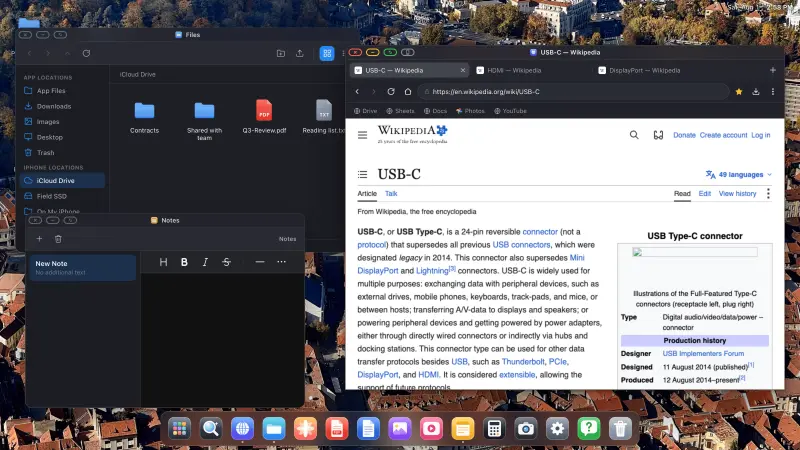
XeOS: External Display Browser lo aborda desde la otra dirección. En lugar de duplicar, renderiza su propio escritorio a la resolución de la pantalla y controla la pantalla externa directamente. Ventanas que puedes mover y redimensionar, un dock, un gestor de archivos, un navegador de escritorio, reproductores multimedia, visores de documentos. En cualquier monitor, tele o proyector, desde cualquier iPhone o iPad que pueda sacar vídeo.
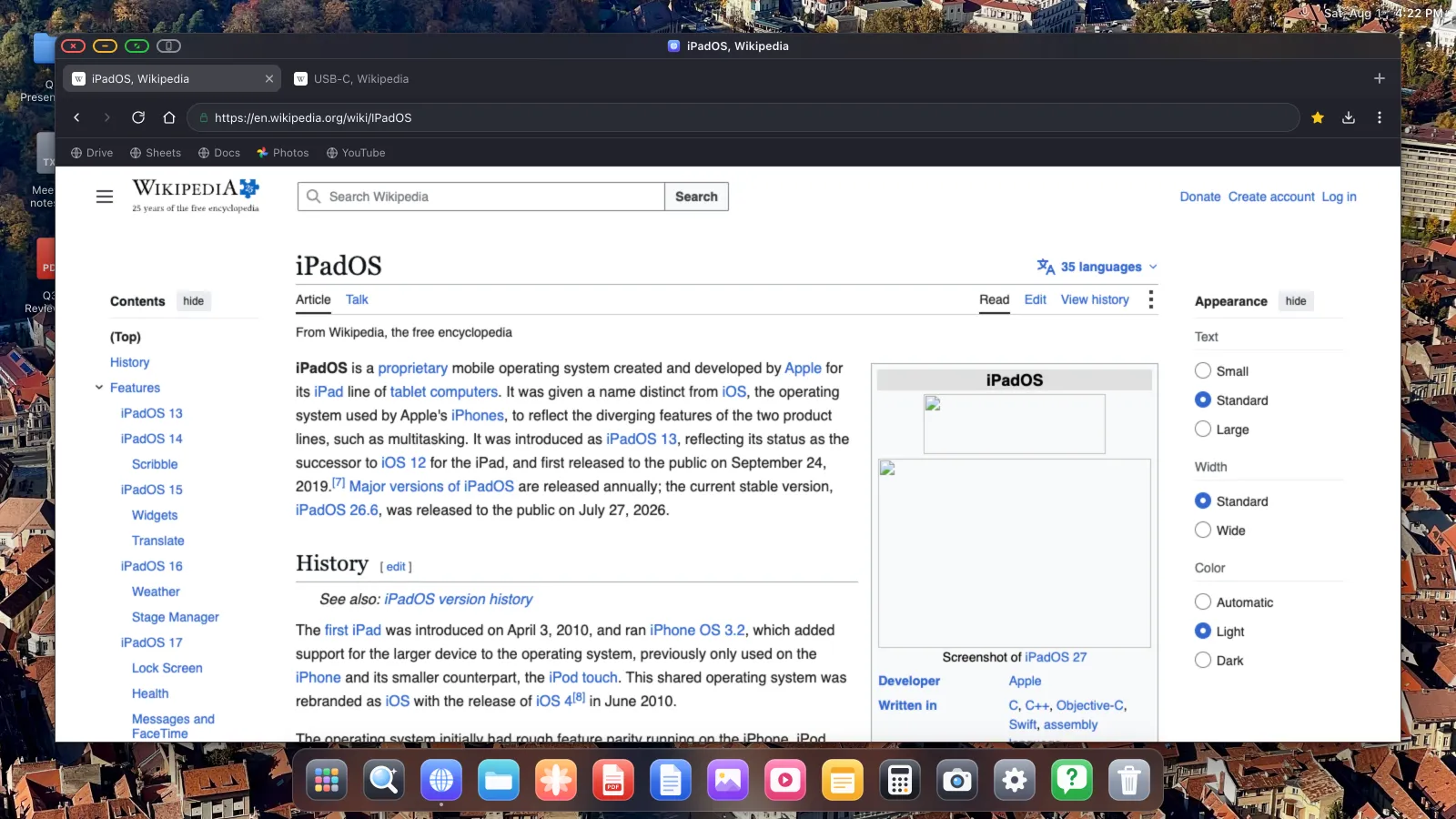
Como dibuja su propio entorno, no depende de Stage Manager, de un chip serie M, ni de que Apple lance nada en absoluto. Un iPad al que Apple nunca dio soporte para pantalla externa consigue un escritorio completo. Un iPhone también.
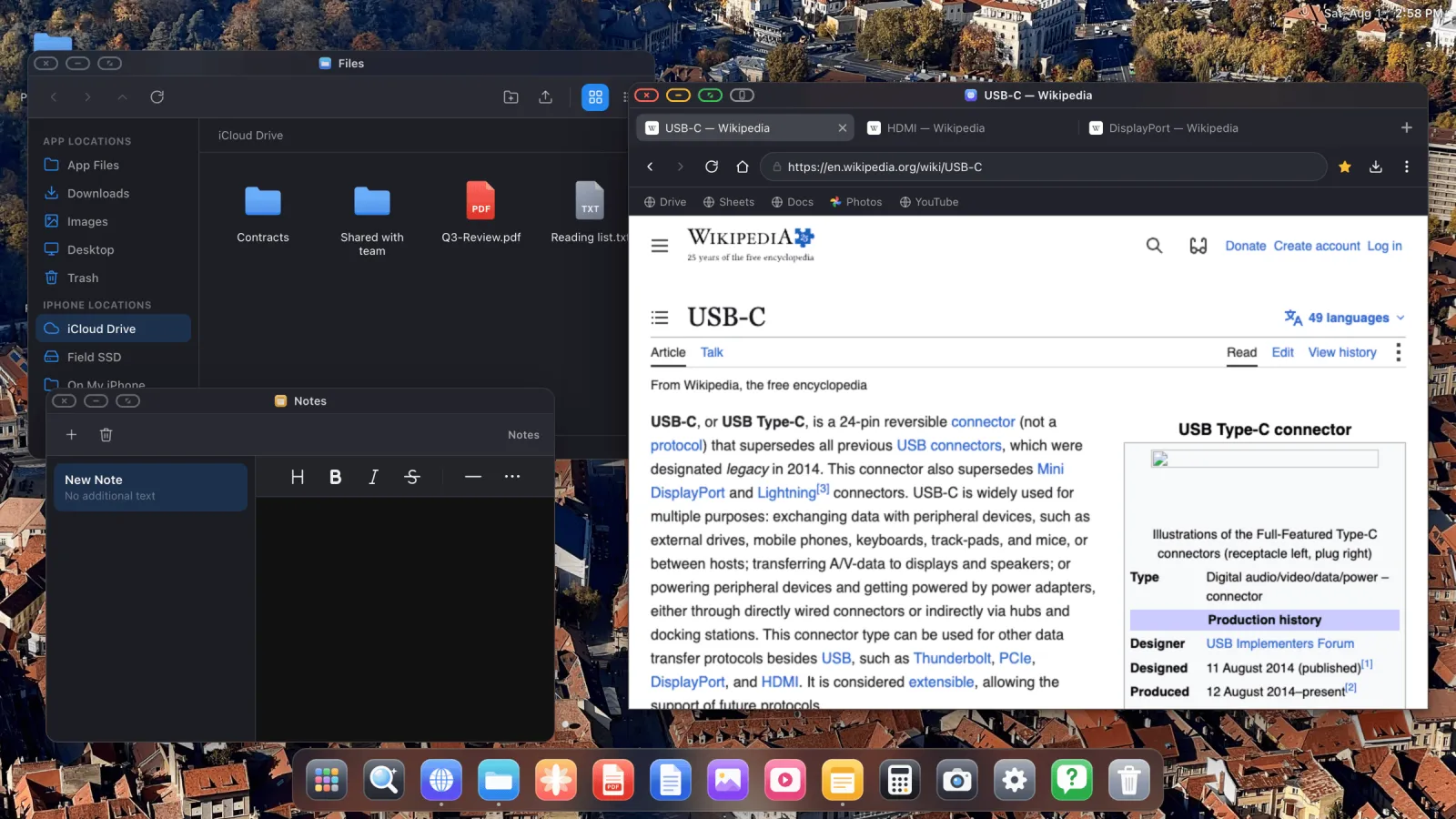
Qué puede hacer
- Un navegador de escritorio con pestañas, barra de marcadores, descargas, un gestor de contraseñas, modo lectura, y un bloqueador de anuncios activado por defecto que gestiona los anuncios en vídeo de YouTube.
- Pantalla completa de verdad. El botón verde de la ventana elimina toda la interfaz, así que el vídeo y las diapositivas llenan el panel de borde a borde. Ver YouTube a pantalla completa es una de las razones más comunes por las que la gente la instala.
- Un gestor de archivos que puede montar carpetas de iCloud Drive, carpetas de tu teléfono y unidades USB externas.
- Un visor de PDF con anotación, más vista previa de Word, Excel y PowerPoint.
- Una app Fotos que lee tu biblioteca de iOS, con un pase de fotos a pantalla completa configurable.
- Sitios web instalables, así que Gmail o Sheets o YouTube se colocan en el dock como su propia app.
- Soporte de ratón y teclado, o la pantalla de tu teléfono como trackpad si no tienes ninguno de los dos.
Las limitaciones
Dos cosas que conviene saber antes de instalar nada.
Es un entorno de escritorio en lugar de iOS en un monitor. Tus otras apps de iPhone no se ejecutan dentro. Lo que funciona es el navegador, las apps integradas, y cualquier sitio web que instales. Eso cubre una parte muy grande de lo que la gente hace en un ordenador, pero no es Instagram en una tele.
Algunos elementos de página incrustados se resisten a un clic desde la pantalla externa. Todo navegador de iOS tiene que usar el motor WebKit de Apple, y los marcos de otro dominio, los avisos de consentimiento, algunos cuadros de inicio de sesión, los campos de pago, están reforzados deliberadamente contra la entrada programática como medida antifraude. Esa protección también atrapa a un cursor que llega desde una segunda pantalla. XeOS lo gestiona con un botón que le pasa la página a la pantalla de tu teléfono para ese único toque y luego la devuelve directamente, explicado por completo en la guía del modo de diseño del dispositivo.
¿Lo lanzará Apple algún día?
Probablemente, con el tiempo, en alguna forma. El código existe y la demanda es evidente. Pero «con el tiempo» ya ha significado más de un ciclo de versiones, casi seguro se limitará al hardware USB-C reciente, y será un modo de ventanas en lugar de un escritorio completo. Si hoy tienes un monitor y un teléfono, esperar no es gran cosa como plan.
XeOS: External Display Browser convierte un iPhone o un iPad en un escritorio completo en cualquier monitor, tele o proyector. No depende de Stage Manager, de un chip serie M ni de una futura versión de iOS.
Preguntas frecuentes
¿Hay un modo escritorio en iOS 26?
No. Se encontró código sin terminar en iOS 26.1 y se cerró en las betas de 26.2, pero no existe ningún modo escritorio lanzado para iPhone.
¿Tiene el iPhone algo parecido a Samsung DeX?
No de Apple. Las apps de terceros son hoy la única vía.
¿Puede algún iPad extender en lugar de duplicar?
Solo los iPads con chip serie M, mediante Stage Manager. Todo lo demás duplica.
¿Necesito un cable especial?
USB-C a HDMI para dispositivos USB-C, un adaptador AV digital Lightning para iPhones Lightning. AirPlay también funciona.
Más del blog
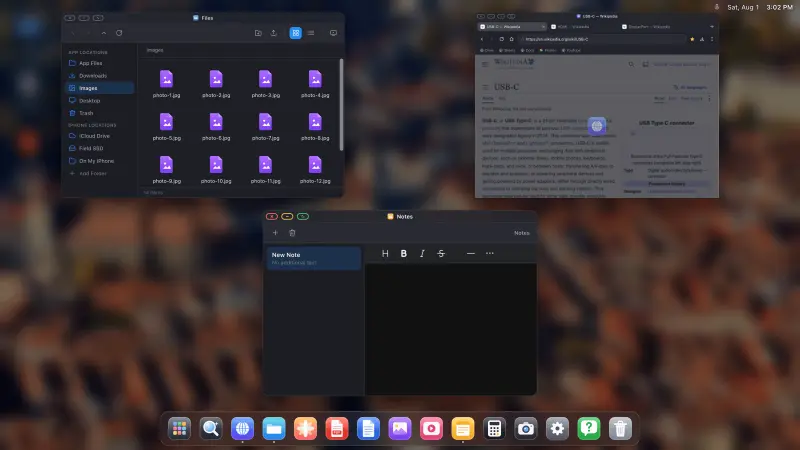
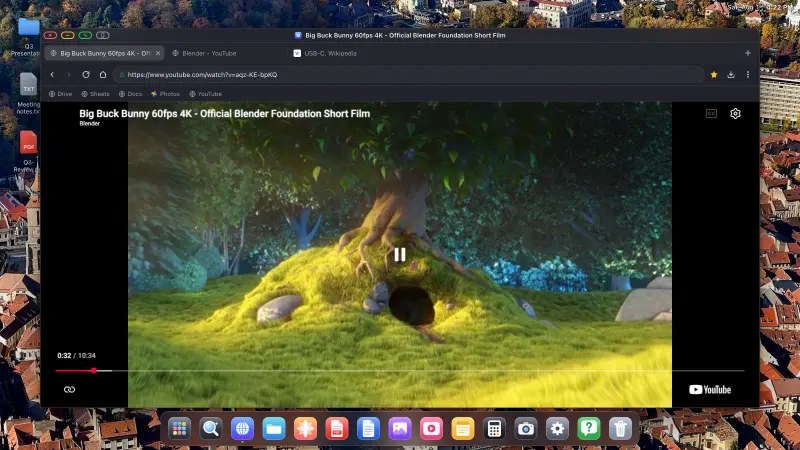
Prueba XeOS: External Display Browser
Pantalla completa en cualquier monitor externo, tele o pantalla portátil. Sin bandas negras. Descárgalo en el App Store.